Use the free program ImageJ to measure phage characteristics. You can either use it online in a web browser, or download the app to a PC.
Setting the Image Scale
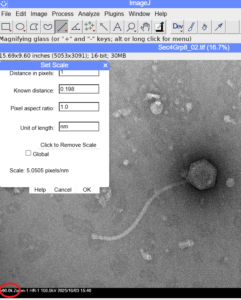
-
- Open the image
- Go to the Analyze tab and select Set Scale
-
- Distance in pixels = 1
- Unit of length = nm
- Input pixel size into Known distance
-
- You can find this value in the .txt metadata file included with your images
- Or look for the image magnification at the bottom left (circled in red) and use the corresponding pixel values:
-
- x50.0k Pixel Size=0.2380
- x60.0k Pixel Size=0.1983
- x80.0k Pixel Size=0.1488
-
-
-
Measuring features
- To measure capsid width, select the Straight Line tool. Click once to specify the beginning point of your line and then drag the mouse to the end point, and release.
- Go to the Analyze tab and select Measure.
- The Results window will open. Scroll to the right to find the Length value.

- Use the Segmented Line tool to measure curved tails more accurately.
